
Learning to type Chinese characters is an essential skill for anyone studying Mandarin or trying to communicate in written Chinese. While typing in Chinese may seem daunting at first, with the right tools and practice, it can become second nature.
In this comprehensive guide, we’ll cover everything you need to know about typing in Chinese on a computer, smartphone, or tablet. Here’s what we’ll be discussing:
By the end of this guide, you’ll have a solid understanding of the various Chinese input methods, know how to setup Chinese typing on all major platforms, and have actionable tips to start improving your typing fluency. Let’s get started!
Table of Contents
Chinese presents unique challenges for typing that don’t exist in alphabetic writing systems like English. Here are some of the reasons why Chinese is considered one of the hardest languages to type:
Thankfully, smart Chinese text input methods have been developed to deal with these challenges and make typing Chinese on modern devices quick and intuitive.
A Chinese input method editor (IME) is a special program or system that allows the conversion of phonetic or shape-based inputs into the correct Chinese characters on a device.
The IME contains a large dictionary of Chinese words and characters with information on pronunciation, shape components, and stroke order. When you type using roman letters or other symbols, the IME does a lookup to match and suggest possible candidates based on context. This saves you from having to memorize thousands of Chinese characters!
Here are the 5 most common Chinese IMEs:
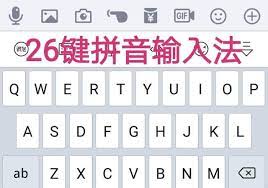
The pinyin input method is the most popular way to type Chinese. It uses the romanization system called Hanyu pinyin to input Chinese characters phonetically.
Pinyin assigns roman letter spellings to the pronunciation of Chinese characters. As you type the pinyin letters, the IME shows you character options that match the pinyin. This allows you to input characters you don’t know how to write.
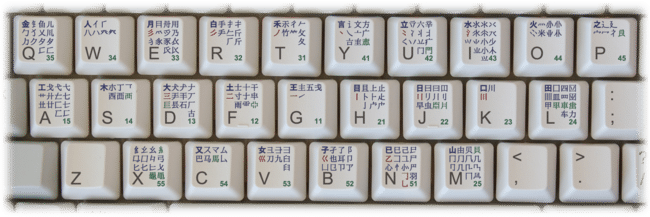
Wubi (五笔, wǔ bǐ) uses unique keystroke combinations based on character shapes and components to input hanzi.
Each Chinese character is mapped to a 5 digit code representing the strokes and radicals. Users memorize codes for common characters. The method is very efficient for typing phrases by muscle memory.
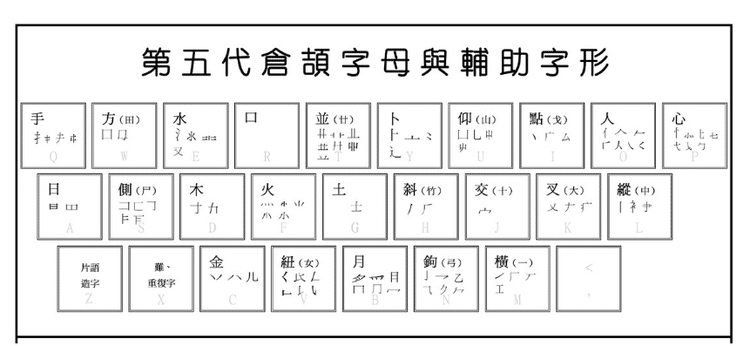
Cangjie (仓颉, cāng jié) works by breaking down hanzi into their key shape components known as radicals. Each radical is assigned to a specific letter key.
By typing the letters corresponding to the radicals in a character, you can input any Chinese character without memorizing specific codes. Cangjie is fast for adept users but has a learning curve.
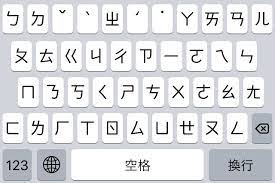
Zhuyin (注音, zhù yīn), also known as bopomofo, uses phonetic symbols to type the sounds of Mandarin Chinese. It was invented in Taiwan and is widely used there.
The 37 zhuyin symbols map to the different sounds in Mandarin. Typing sequences of zhuyin provides accurate phonetics for hanzi output.
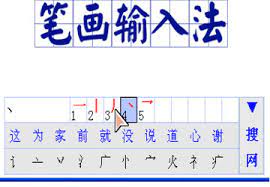
The stroke or radical methods allow you to input characters directly based on the count or sequence of strokes or radicals.
You would type out the strokes and radicals to narrow down and select the desired character. Less common outside of Taiwan and Hong Kong.
Now that you know the 5 main input methods, how do you choose which one is right for you?
There are a few key factors to consider when picking a Chinese text input method:
For most learners, starting with pinyin or zhuyin provides the best balance of usability and language learning. The phonetic nature and predictive text allow for quick, intuitive typing.
Advanced users can add a secondary method like wubi or cangjie to maximize typing efficiency. Testing out different IMEs to find your favorite is recommended.
Now let’s go over how to setup and use Chinese IMEs on all major platforms.
Modern operating systems make it easy to activate Chinese text input support. Here’s how to get started on Windows, Mac, iOS and Android devices:
Other options like keyboard shortcuts, IME settings and custom dictionaries can be configured as well. Typing in Chinese on Windows takes just minutes to setup!
Mac OS also offers advanced IME settings and customization for user-defined hotkeys, dictionaries, and keyboard layouts.
For advanced iOS typing, add other Chinese keyboards like Cangjie or Handwriting Recognition. iPhones provide seamless typing in Chinese using predictive pinyin.
Android offers robust Chinese typing with apps like Google Pinyin and Sogou. Try different keyboards to find one with the optimal features and accuracy for your needs.
With your device now setup for Chinese text input, it’s time to practice typing and improve your speed and accuracy!
Typing Chinese well takes regular practice and usage over an extended period. Here are helpful tips:
With regular usage, Chinese typing will transition from a slow, tedious process to a fast, intuitive skill!
Speaking Chinese and having it converted to text can save a lot of time compared to manual typing.
Smartphone assistants like Siri and speech-to-text apps provide voice dictation capabilities in Chinese. Here are some ways to leverage voice input:
Voice makes Chinese content creation much more efficient. Give dictation a try to boost your productivity!
Being able to type Chinese unlocks many benefits:
Fluency in Chinese typing enables you to fully leverage online resources, deeply engage with native materials, and become more proficient in the language.
Make the investment to learn typing now and reap dividends through enhanced fluency and efficient digital communication in your target language.
Typing Chinese presents unique challenges but modern IMEs make inputting hanzi fast and intuitive on any device. With an intelligent input method like pinyin and regular practice, Chinese typing can become second nature.
Remember these key tips as you improve your skills:
With the right strategies, learning to type Chinese characters can be easy and enjoyable. This indispensable skill will provide a bridge to communicate seamlessly in text, access content in Chinese, and take your language abilities to the next level. Just take it one hanzi at a time.
